


Outlook freezes clicking the Signature button
Last Updated: August 14, 2018
ISSUE
When you click the Signature button, Outlook hangs and you are not able to add a signature.
This issue occurs if you install an Office subscription on a PC that has pre-installed Microsoft Office desktop apps.
Note: This issue is fixed in Office Version 1802 (Build 9029.2167) or higher. When you install an Office Subscription with that build or higher, it will automatically remove the pre-installed Microsoft Office Desktop apps.
STATUS: WORKAROUND
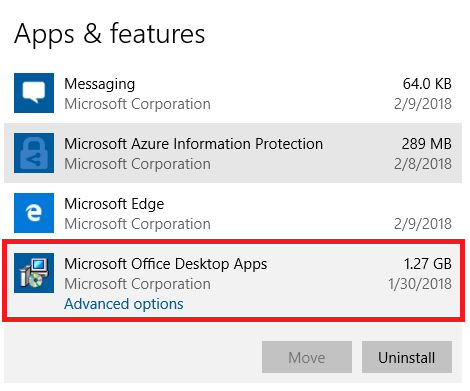
To workaround this issue, uninstall the pre-installed Microsoft Office Desktop Apps:
-
Right click the Windows Start button and click Settings.
-
Click Apps, and then click Apps and Features.
-
Choose Microsoft Office Desktop Apps and click Uninstall.
-
Restart your PC.
-
Run a repair of Office to make sure everything gets fixed.
If this method is unsuccessful, follow these steps to remove Office setup registry keys are still incorrectly remaining in the registry:
Note: Before you edit the registry, we recommend that you make a back up of your registry. If a problem occurs, you can then restore the registry to its previous state. Learn more about How to back up and restore the registry in Windows.
-
Press the Windows key
 + R to open a Run window.
 -
Type regedit and click OK.
-
Press CTRL + F and enter 0006F03A-0000-0000-C000-000000000046 into the search box, then click Find Next.
-
Delete the key by right-clicking on the entry and click Delete.
-
Press F3 to repeat the search until no more registry keys are found.
Thông tin khác
- » Hướng dẫn xử lý lỗi Icon máy tính chuyển sang ứng dụng Media Center. - Hướng dẫn sửa lỗi các biểu tượng icon, shortcut trở thành windows media center (30.12.2024)
- » Hướng dẫn thay đổi ngôn ngữ trên máy tính Win 10 , 11 (19.12.2024)
- » Hướng dẫn tắt cảnh bảo Giấy Phếp Autocad của bạn không hợp lệ triệt để (17.07.2023)
- » Hướng dẫn cách bỏ qua Wifi khi thiết lập Windows 11 (13.07.2023)
- » Xử lý lỗi Kaspersky chặn mạng LAN (05.07.2023)
- » Khắc phục báo lỗi PPP khi sử dụng Smart VPN client Draytek Smart VPN Client No PPP Control Protocols Configured Error (20.06.2023)
- » Hướng dẫn cài đặt địa chỉ Email vào ứng dụng Outlook trên máy MAC (19.05.2023)
- » Hướng dẫn sử dụng Block Update Control 2.0 – Công Cụ Tắt Update Trên Windows 10/11 (20.04.2023)


